
建站日志(未完结)
前言
Q:为什么我要搭建一个笔记网站
A:因为我在做软件开发学习时发现我需要将某些重要的代码逻辑功能记录下来,以便我日后要修改代码时可以快速理解代码功能,vitepress是一个可以快速上手创建一个文档网站的静态站点生成器, 而文档的编写语言采用的是markdown语法, markdown是一个对程序员记笔记很友好的语言,于是我选择使用markdown做笔记
一、vitepress搭建
- 准备工作
- 安装node.js
版本:v18.20.4
- 安装npm
安装好node.js后npm也会一并安装
- 搭建过程
- 我是通过视频学习vitepress搭建的,非常感谢AZ_Channel的视频经验分享

- 搭建好网站后,为了更好的做笔记,开始学习markdown语法
- markdown语法和插件设置,我是参考了毛怪的学习日记的视频讲解

- 因为vitepress原生的markdown不支持数学公式渲染和mermaid,所以需要自行安装配置。
- 参考安装方法TeX和vitepress-plugin-mermaid
- 我是通过视频学习vitepress搭建的,非常感谢AZ_Channel的视频经验分享
插件添加
评论区添加
创建好仓库,在👉giscus👈网站上配置一下设置就好啦。
得到这段<script>标签,可以直接嵌入到你的HTML中。
js
<script src="https://giscus.app/client.js"
        data-repo="仓库名"
        data-repo-id="仓库ID"
        data-category="General"
        data-category-id="分类ID"
        data-mapping="pathname"
        data-strict="0"
        data-reactions-enabled="1"
        data-emit-metadata="0"
        data-input-position="bottom"
        data-theme="preferred_color_scheme"
        data-lang="zh-CN"
        data-loading="lazy"
        crossorigin="anonymous"
        async>
</script>如果使用vitepress,也可以写一个vue组件。
javascript
<script setup lang="ts">
import Giscus from "@giscus/vue";
import DefaultTheme from "vitepress/theme";
import { watch } from "vue";
import { inBrowser, useData } from "vitepress";

const { isDark, page } = useData();

const { Layout } = DefaultTheme;

watch(isDark, (dark) => {
    if (!inBrowser) return;

    const iframe = document
        .querySelector("giscus-widget")
        ?.shadowRoot?.querySelector("iframe");

    iframe?.contentWindow?.postMessage(
        { giscus: { setConfig: { theme: dark ? "dark" : "light" } } },
        "https://giscus.app"
    );
});

</script>
<template>
    <Layout>
        <template #doc-footer-before> </template>
        <template #doc-after>
            <div style="margin-top: 24px">
                <Giscus id="comments" repo="仓库" repoId="仓库ID" category="General"
                    categoryId="分类ID" mapping="pathname" strict="0" reactions-enabled="1"
                    emit-metadata="0" input-position="bottom" lang="zh-CN" crossorigin="anonymous"
                    :theme="isDark ? 'dark' : 'light'" />
            </div>
        </template>
    </Layout>
</template>
<style scoped></style>然后在主题设置index.ts里应用就可以了。
ts
// https://vitepress.dev/guide/custom-theme
import { h } from 'vue'
import DefaultTheme from 'vitepress/theme'
import './style.css'
import type { Theme } from "vitepress";
import Mylayout from './components/Mylayout.vue'

export default {
	Layout: () => {
		return h(Mylayout, null, {});
	},
} satisfies Theme;bug解决
1. mathjax3滚动条
 非常恶心人啊,这个滚动条,手机游览的时候,不小心一划,公式就给划没了,电脑也是,滚轮一滚就没了。
解决方案:
可以在style.css中添加一段禁用滚动条指令
css
/* 禁用mjx的滚动条 */
mjx-container {
  overflow-y: hidden;
}2. mermaid字体显示
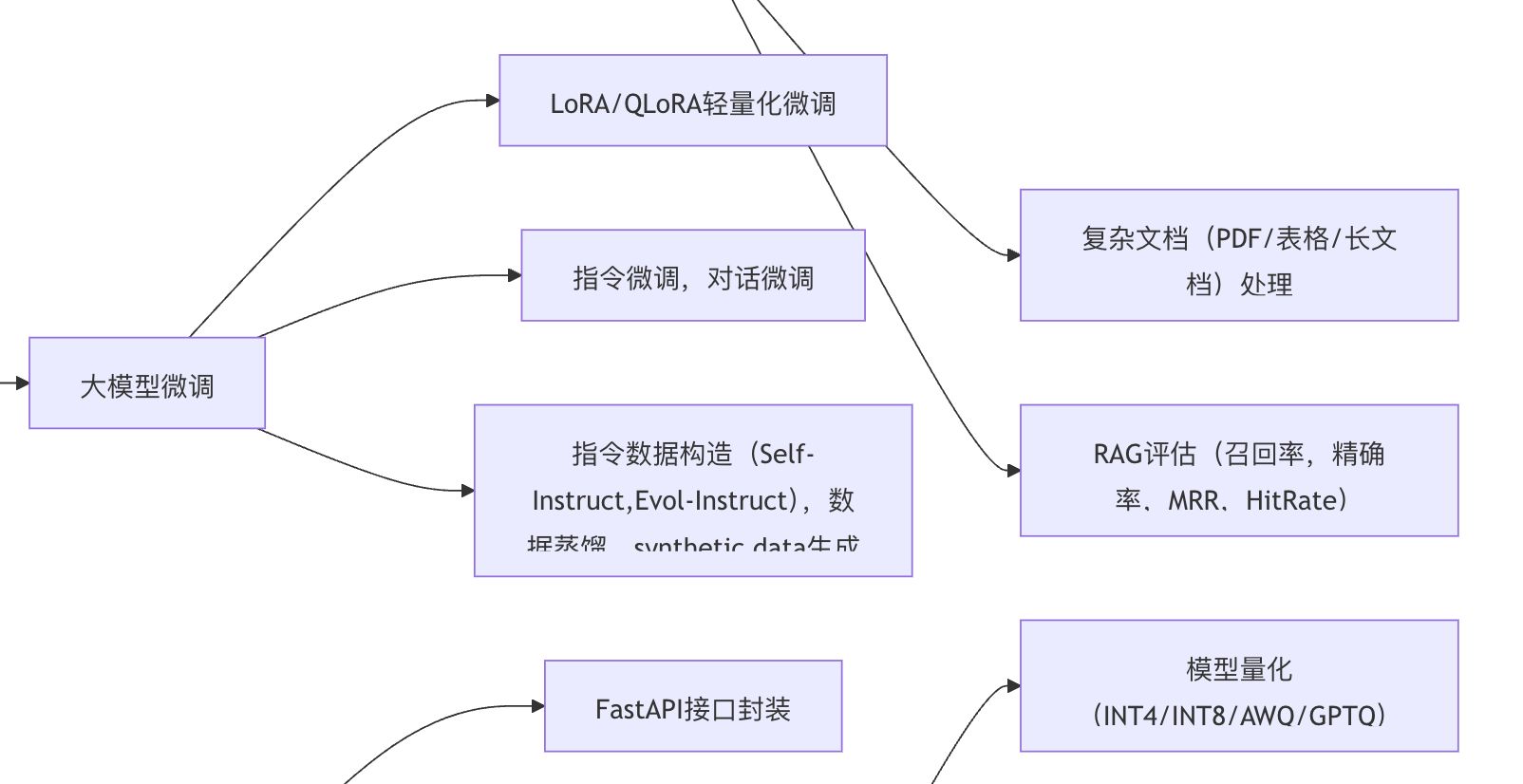
渲染有多行文字的框图时,最后一行字体显示不完全!
解决方案:写一个css让文字整体向上移动
css
.mermaid .nodeLabel,
.mermaid foreignObject > div {
  transform: translateY(-3px) !important; /* 向上移动3像素*/
  display: flex !important;
  align-items: center !important; /* 保持内容在调整后的位置居中 */
  justify-content: center !important;
  box-sizing: border-box !important;
}